
After a lot of trial and error on and off I finally managed to get one of my Asus router to connect to my openVPN implementation in pfSense and having traffic flow both directions!
This is the guide I used mostly and that really pointed me in the correct direction to make this work!
Server
pfSense running virtual on XCP-ng.
Create the OpenVPN server
Basics:
Server mode: Peer to Peer (Shared Key)
Encryption Algorithm: AES-128-CBC (Must match on client and server)
NCP Algorithms: AES-128-* (all 6)
Aith digest algorithm: SHA256
IPv4 Tunnel Network: A range not used on any side of the networks, I used 10.0.8.0/24
Gateway creation: IPv4 only
IPv4 Remote network(s): List the networks on the client side.
Firewall
Open the firewall for the UDP port used in the creation of the OpenVPN server.
Routing/firewall
This is a really important step that I didn't do the first fifty times I tried to get this working...
VPN will connect but won't pass any traffic from site to site.
Go into interfaces and assignments.
Select the ovpns* for the listed OPT* interface and add.
Then go to into interfaces and select that interface.
Click checkbox to enable it and save/apply.
Go back into firewall/Rules and the OPTx interface and create a rule to pass any to any. Same with the OpenVPN tab, add a rule to pass any to any.
(Some guides I've seen don't list these steps and some only lists the OpenVPN tab step, I did both).
After this restart the OpenVPN service and you should see an ip on the new interface.
(If it doesn't work then try a reboot of pfSense before doing to much fiddleing around :-))
Repeat these steps for each connection.
Client
The Asus router (RT-AC87U) is running the latest available Asuswrt-Merlin.
Basic settings
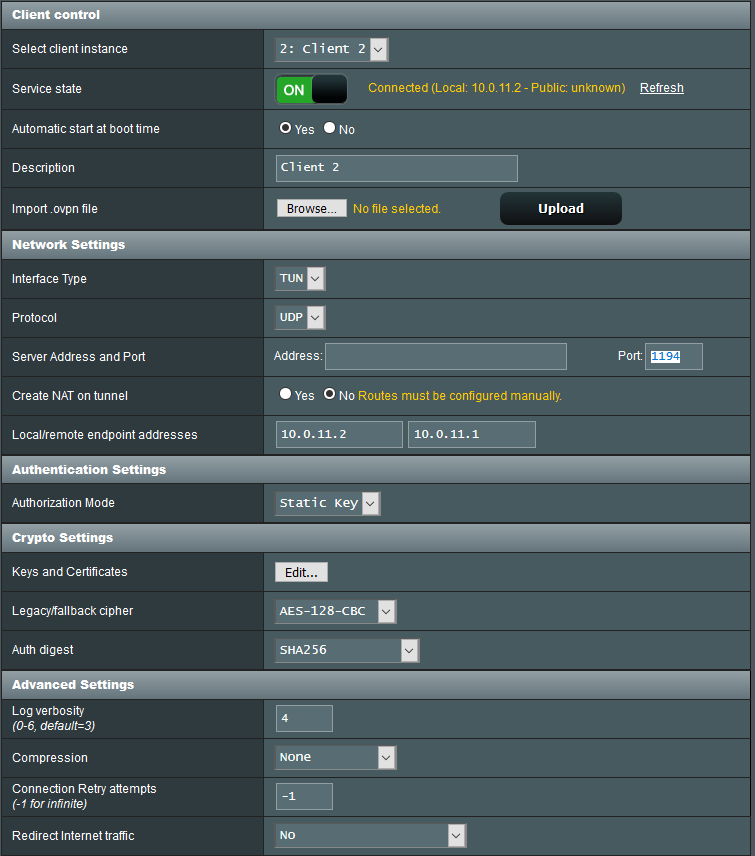
Custom configuration
resolv-retry infinite
persist-key
persist-tun
keepalive 10 60
route 192.168.1.0 255.255.255.0
Redirecting internet traffic through server
Really banged my head on the wall with this one, but it is quite obvious when you think about it..
For this to work you need to set up an outbound NAT for the remote ip range.
Go into Firewall / NAT / Outbound
Set the mode to "Hybrid Outbound NAT rule generation" to allow automatic NAT and manual NAT.
Create a new manual NAT entry for the remote ip range.
For example 192.168.5.0/24
Save and apply the rule and now traffic can flow from the remote router to internet on the server.